Integrations
The mailboxes, folders and systems Quote Hub exchanges data with, and the activity log for each.
Quote Hub exchanges data with Score's email, OneDrive and SharePoint folders, D365 and SAS through mailboxes and files. The Integrations tab shows each connection and a log of recent activity, so you can confirm that emails go out and files land where they should.
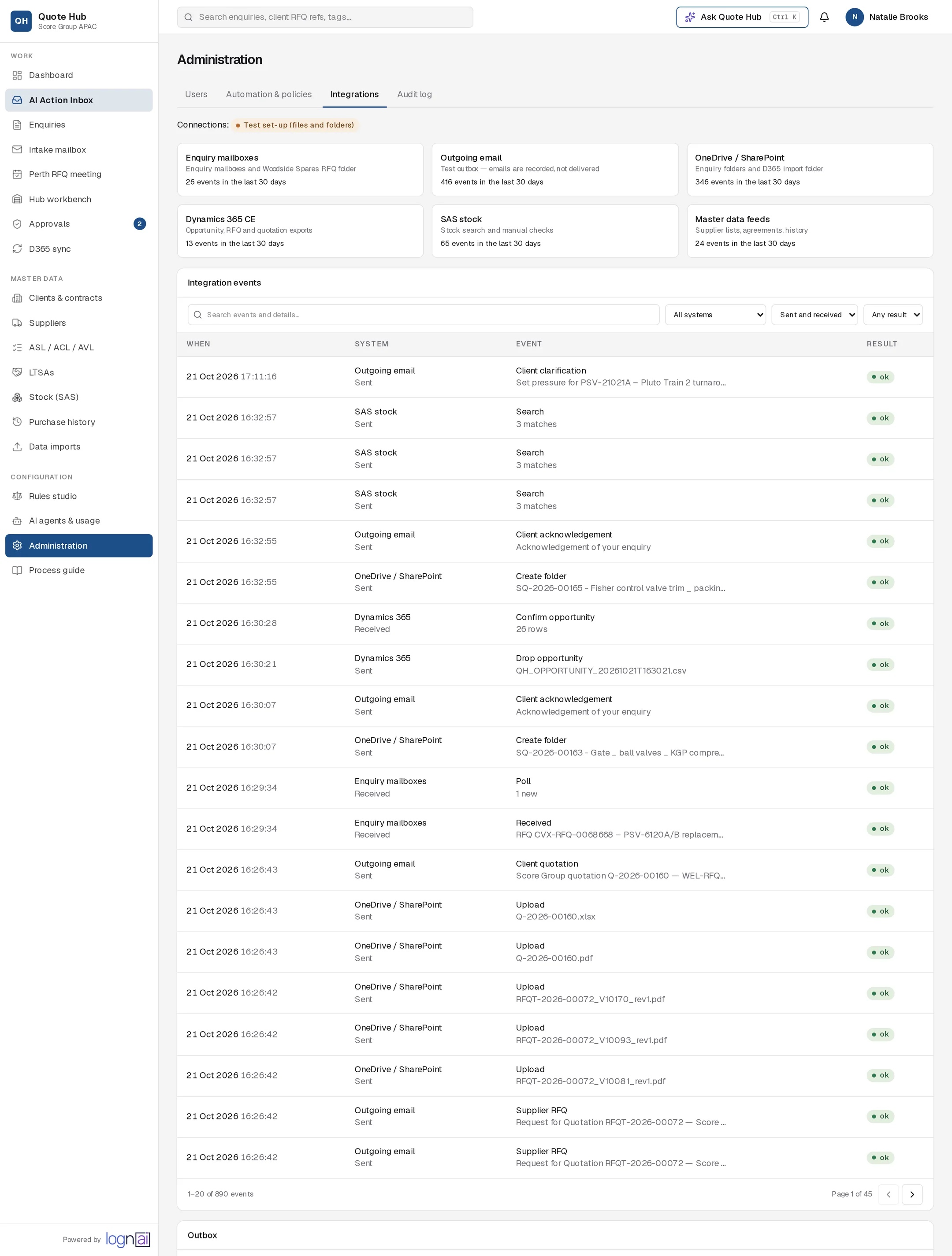
Connections
| Card | What it covers |
|---|---|
| Enquiry mailboxes | The enquiry mailboxes and the Woodside Spares RFQ folder. Quote Hub checks them on the schedule set in Automation & policies. |
| Outgoing email | Emails Quote Hub sends: acknowledgements, clarifications, supplier RFQs, portal access codes, quotations and reminders. The card shows how emails are sent. |
| OneDrive / SharePoint | The enquiry folders where documents are filed, and the D365 import folder where CSV batches are dropped |
| Dynamics 365 CE | Opportunity, RFQ and quotation import files. See D365 sync. |
| SAS stock | Stock searches and manual stock checks against the SAS stock data |
| Master data feeds | Uploads on Data imports: supplier lists, agreements and history |
Each card shows how many integration events that connection had in the last 30 days. A connection with no recent events has not been used lately.
Connections at the top shows whether Quote Hub is connected to Score's live systems (Live) or running in a test set-up (Test set-up (files and folders)).
Integration events
Every exchange with another system, newest first, 20 to a page:
| Column | Example | Meaning |
|---|---|---|
| When | 20 Oct 2026 20:37:28 | When it happened |
| System | Outgoing email, Sent | Which connection, and whether Quote Hub received or sent it |
| Event | Upload, with the file name below | What was done, with the key detail |
| Result | ok or error | Whether it succeeded |
- Search finds events by what was done or by anything in their details: an email subject or address, a file or folder name, a part number.
- Filters narrow to one system, to sent or received, or to errors only.
- Select a row to see its details: recipients and subject, the file path, what a stock search looked for, how many rows an import had, or the error. Raw details (JSON) shows the record exactly as stored, with a copy button. For an outgoing email, Open the email shows the message itself.
Look here first when someone reports a missing email or file. Filter to errors to see which step failed.
Outbox
Every email Quote Hub sent, newest first, 20 to a page, with the subject, recipient, email type (for example Supplier RFQ, Client quotation, Portal OTP) and status sent or failed.
- Search by subject or recipient. Filters narrow to one email type or to failed emails.
- Select a row to read the email as the recipient sees it, with the recipients, the delivery status, any error, and a link to its enquiry.
To see the emails for one enquiry, open the enquiry's Activity & D365 tab. See Audit log.
Good to know
- Quote Hub does not sync with D365 in both directions. It produces import files; you confirm the import on D365 sync.
- Portal access codes (Portal OTP) are emailed whenever a client or supplier signs in to the portal, so they make up much of the outbox. In the test set-up nothing is delivered, so this is where you find a code: filter the outbox to Portal OTP; the code is in the subject.
- This tab is read-only. Changing a mailbox, folder or provider is a set-up change made outside Quote Hub.